
Pre-Setup Considerations
You will need to add the following entries to your to your hardware's ACL/Walled Garden configuration.
- cdn.gtranslate.net
- fonts.gstatic.com
- www.gstatic.com
- translate.googleapis.com
- translate-pa.googleapis.com
- translate.google.com
The following instructions are provided as a stand-alone solution for users of the platform who wish to add language translation to their splash page.
Please note that we do not offer support for the steps described in this article.
- Login to your Smart WiFi Dashboard
- Use the menu to the left to navigate to Network ➡️ Splash Pages
- Click the blue edit icon for the Splash Page you want to add translate functionality to
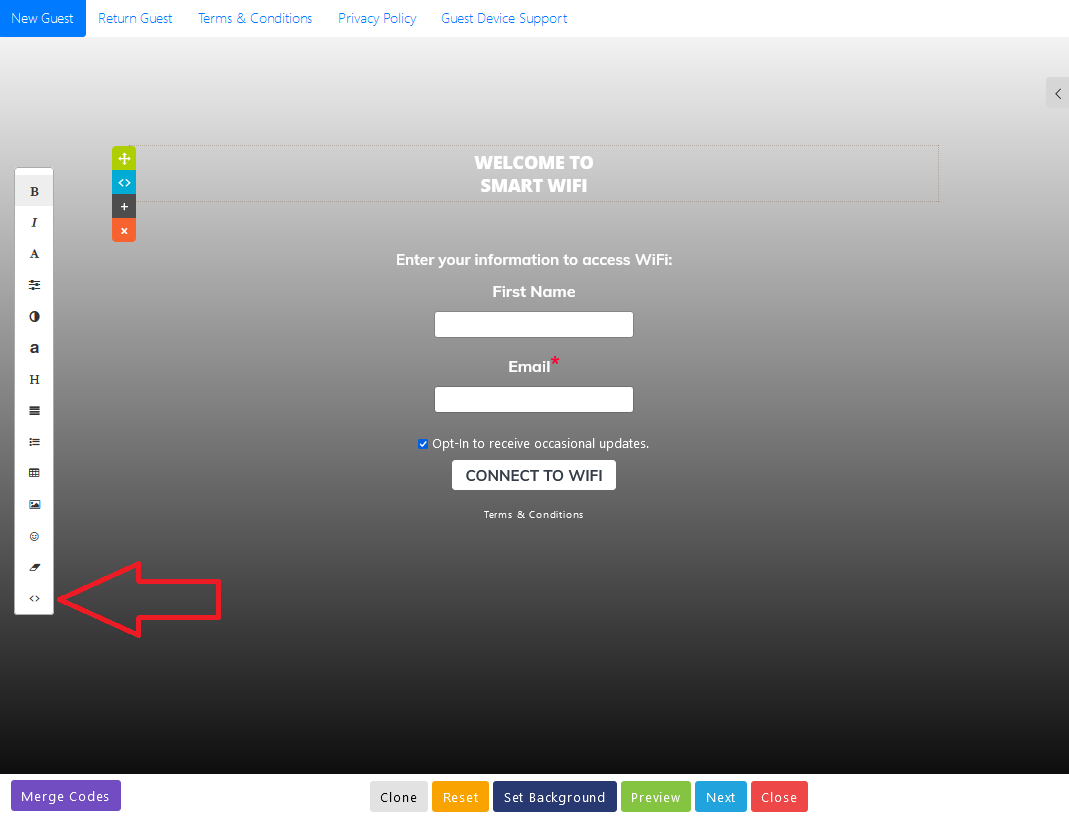
- Click on the top content block of your page and then click the <> button on the menu bar to the left.
- Paste the following code into the html code window and press OK
<script>window.gtranslateSettings = {"default_language":"en","detect_browser_language":true,"wrapper_selector":".gtranslate_wrapper"}</script>
<script>
window.addEventListener('DOMContentLoaded', function() {
var urlPartial = 'hotspotlogin';
if (window.location.href.indexOf(urlPartial) > -1) {
var script = document.createElement('script');
script.src = 'https://cdn.gtranslate.net/widgets/latest/float.js';
document.head.appendChild(script);
}
});
</script>
<div class="gtranslate_wrapper"></div> - Repeat steps 4 and 5 for the Return Guest page
- Save your Splash Page
Use at your own risk
This guide is offered as is and could introduce problems with the guest experience unrelated to the SmartWiFiPlatform itself. As of September 3rd, 2025 our lab engineers have identified the following behaviors.
- Translation results my vary by language.
- There may be a delay in the language of the page changing if your hotspot uses Ubiquiti Unifi gateways.
- Devices loading the splash page in a full browser (Windows, Macs, etc..) may experience a delay in the language of the page changing.