
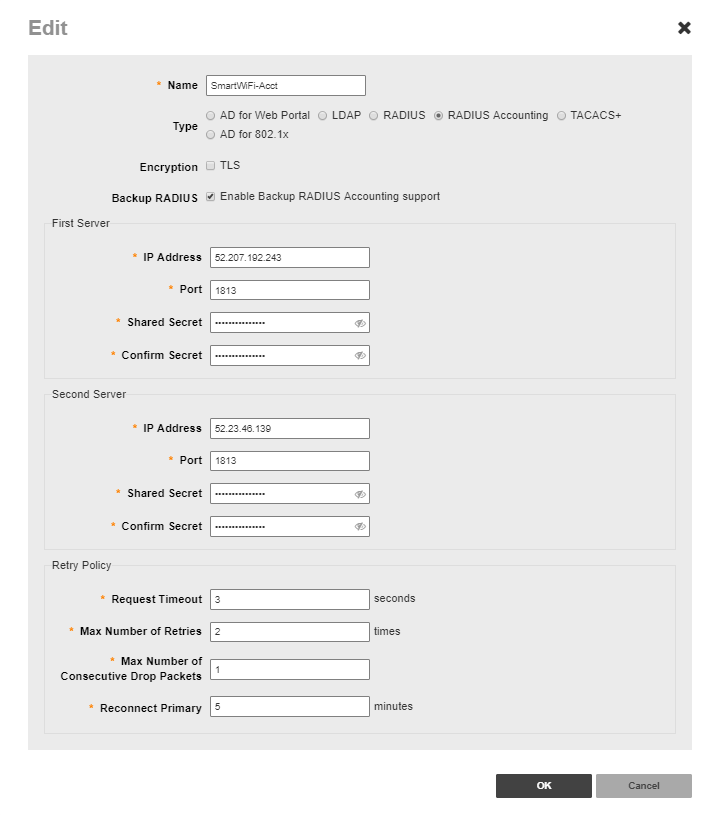
The following instructions outline how to setup a Ruckus ZoneDirector 1200 network for the Marketing4WiFi Platform. This guide covers details such as configuring RADIUS, walled garden entries, and captive portals. This guide assumes that your ZoneDirector is already operational and on a live network. Please make sure any firewall rules, web content filters, and other security measures have been configured to interface with the platform. 1. Login in to your Ruckus Zone Director 1200
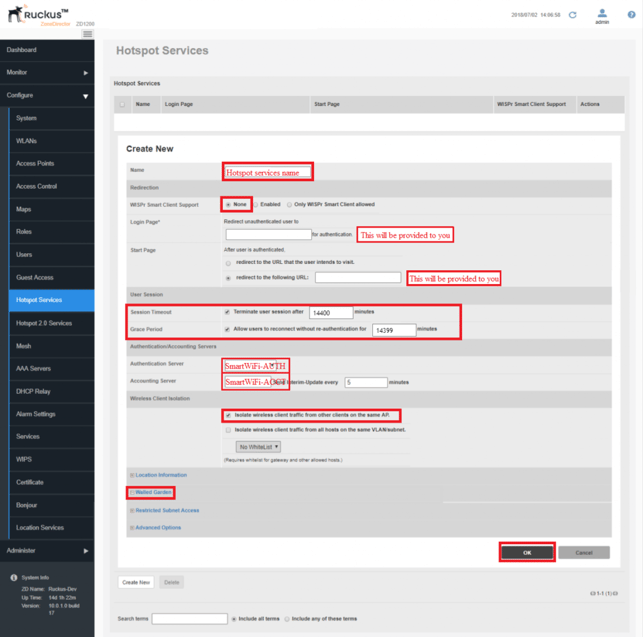
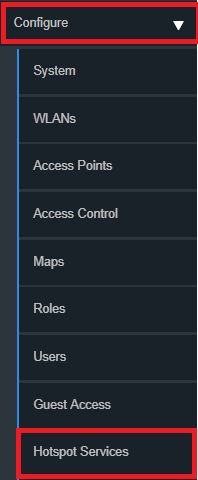
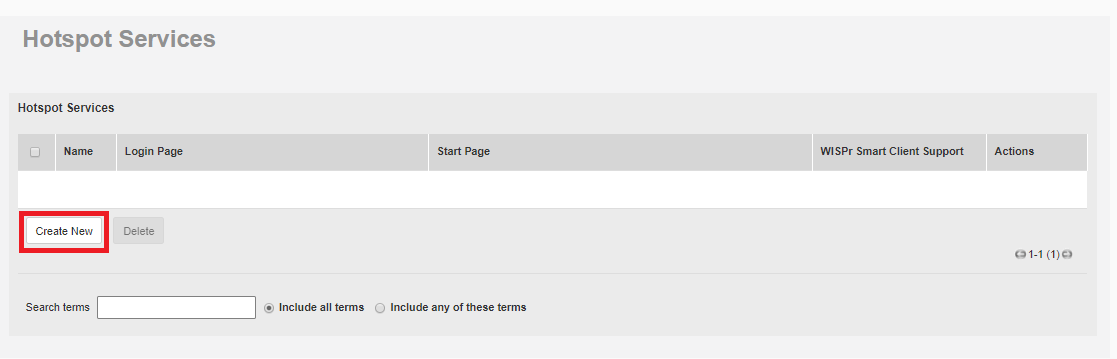
 5. Configure Captive Portal Click Configure and select Hotspot Services
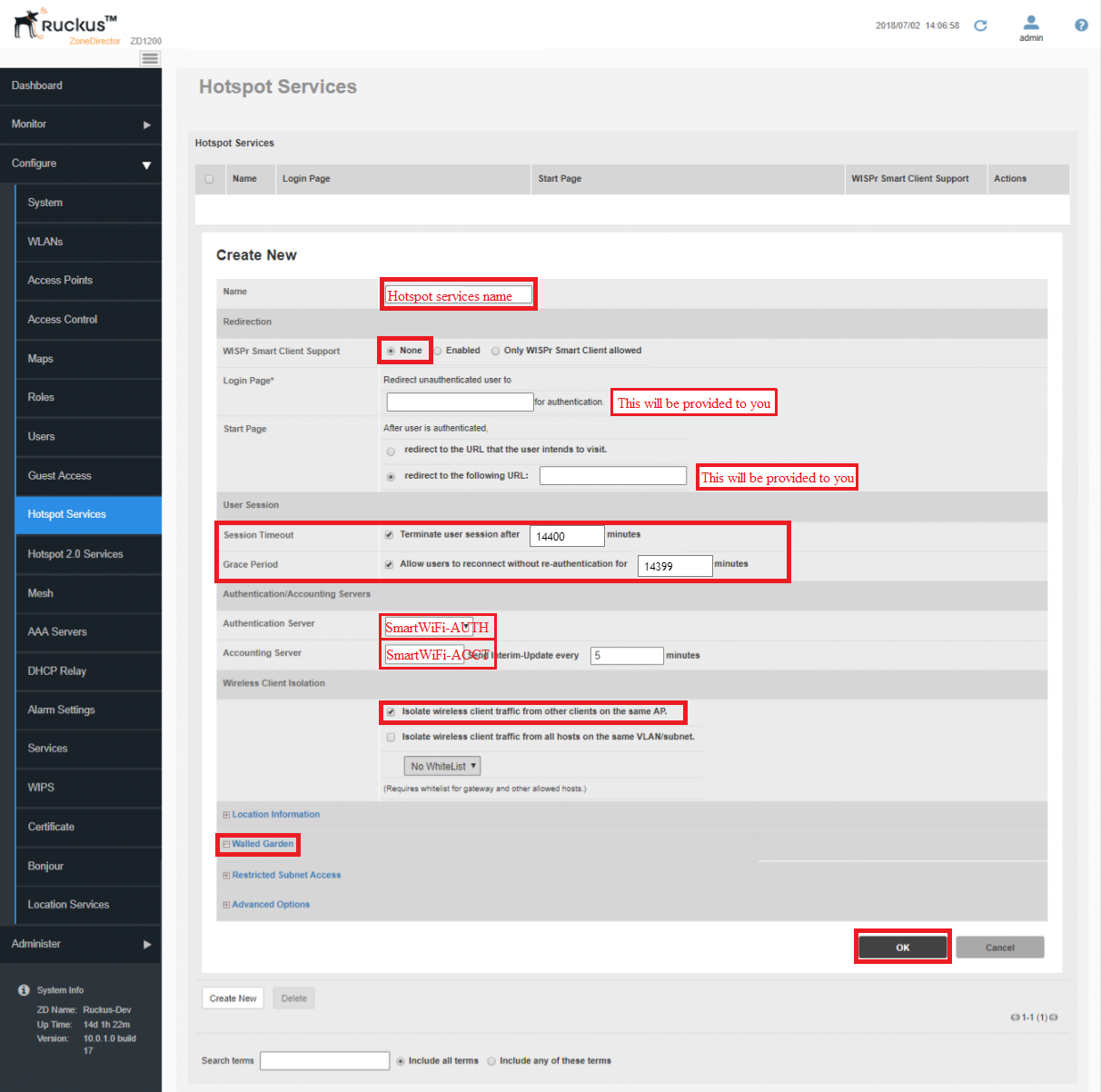
3. Under Start Page select the radio button "redirect to the following URL:" Redirect URL:
4. Under Authentication /Accounting Servers Select the correct Authentication Server "SmartWiFi-AUTH" Select the correct Accounting Server "SmartWiFi-ACCT" 5. Under Wireless Client Isolation Check the first radio button "Isolate wireless traffic from other clients on the same AP."
[ht_message mstyle="alert" title="" show_icon="" id="" class="" style="" ]Under Walled Garden Entries Walled Garden entries are updated semi-frequently, please always use the link above for the most up-to-date walled garden entries. Please use the list containing the wild card entries. Example: *.domain.com[/ht_message]
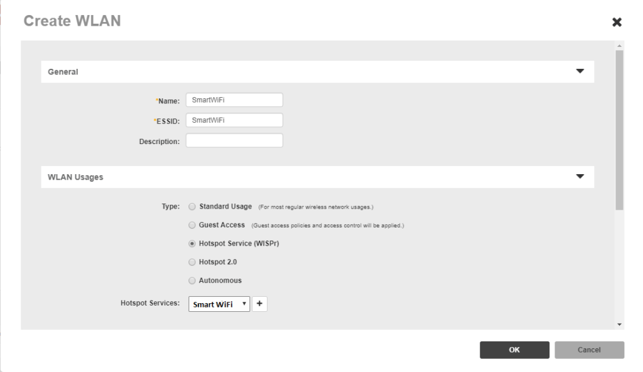
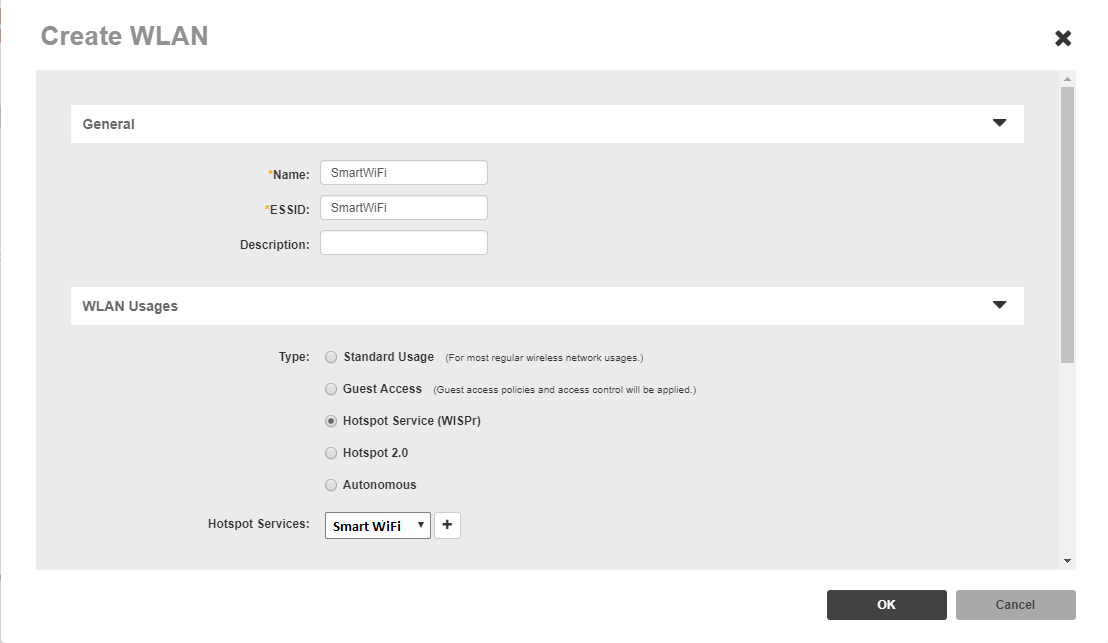
 6. Apply the Hotspot services to WLAN.
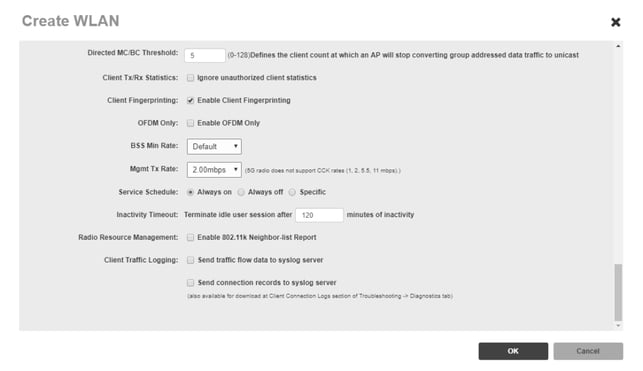
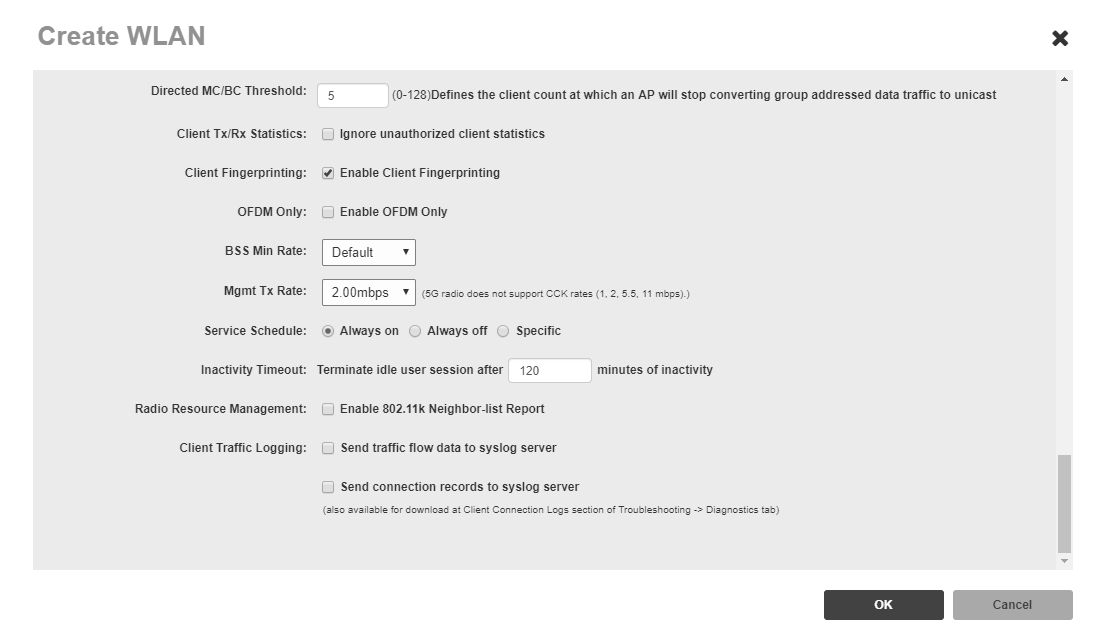
 Under Advanced options look for Inactivity Timeout and set it to a value greater than the Idle timeout of the session profile in the dashboard.
 7. Final Step To complete the set of your Smart WiFi you will need to SSH using an application like Putty to the ZoneDirector and type the commands below, one line at a time. The final step makes it so only the base AP MACs are necessary to enter into the dashboard as gateways.
[ht_message mstyle="info" title="" show_icon="" id="" class="" style="" ]When presenting the splash page guests may see a SSL certificate error. Please see this article regarding
Manufacturer SSL certificates.[/ht_message]
[ht_message mstyle="alert" title="" show_icon="" id="" class="" style="" ]If Android devices are redirecting to the intended Splash page properly but Apple IOS devices are not redirecting please click
HERE.[/ht_message]
[ht_message mstyle="alert" title="" show_icon="" id="" class="" style="" ]Disclaimer on hardware configuration guides in the KB: This equipment has been integrated and tested in our labs with the Marketing4WiFi using the firmware versions below.
ZoneDirector Version 10.0.1.0 LIMITED HARDWARE SUPPORT: Hardware manufacturers frequently make changes to firmware, controllers and GUI’s. The information below may be out of date or images may be different and is to be used as a general reference guide. We do offer additional limited support to help with trouble-shooting and we highly recommend that you have a hardware support agreement and/or access to a hardware support engineering representative from the manufacturer.[/ht_message]
7. Final Step To complete the set of your Smart WiFi you will need to SSH using an application like Putty to the ZoneDirector and type the commands below, one line at a time. The final step makes it so only the base AP MACs are necessary to enter into the dashboard as gateways.
[ht_message mstyle="info" title="" show_icon="" id="" class="" style="" ]When presenting the splash page guests may see a SSL certificate error. Please see this article regarding
Manufacturer SSL certificates.[/ht_message]
[ht_message mstyle="alert" title="" show_icon="" id="" class="" style="" ]If Android devices are redirecting to the intended Splash page properly but Apple IOS devices are not redirecting please click
HERE.[/ht_message]
[ht_message mstyle="alert" title="" show_icon="" id="" class="" style="" ]Disclaimer on hardware configuration guides in the KB: This equipment has been integrated and tested in our labs with the Marketing4WiFi using the firmware versions below.
ZoneDirector Version 10.0.1.0 LIMITED HARDWARE SUPPORT: Hardware manufacturers frequently make changes to firmware, controllers and GUI’s. The information below may be out of date or images may be different and is to be used as a general reference guide. We do offer additional limited support to help with trouble-shooting and we highly recommend that you have a hardware support agreement and/or access to a hardware support engineering representative from the manufacturer.[/ht_message]

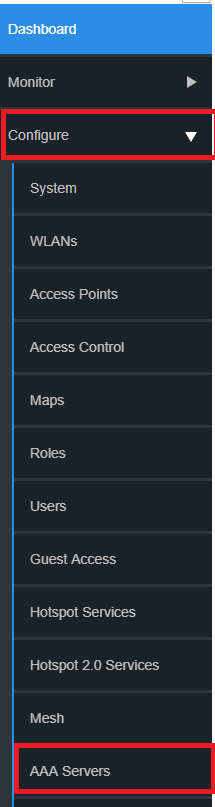
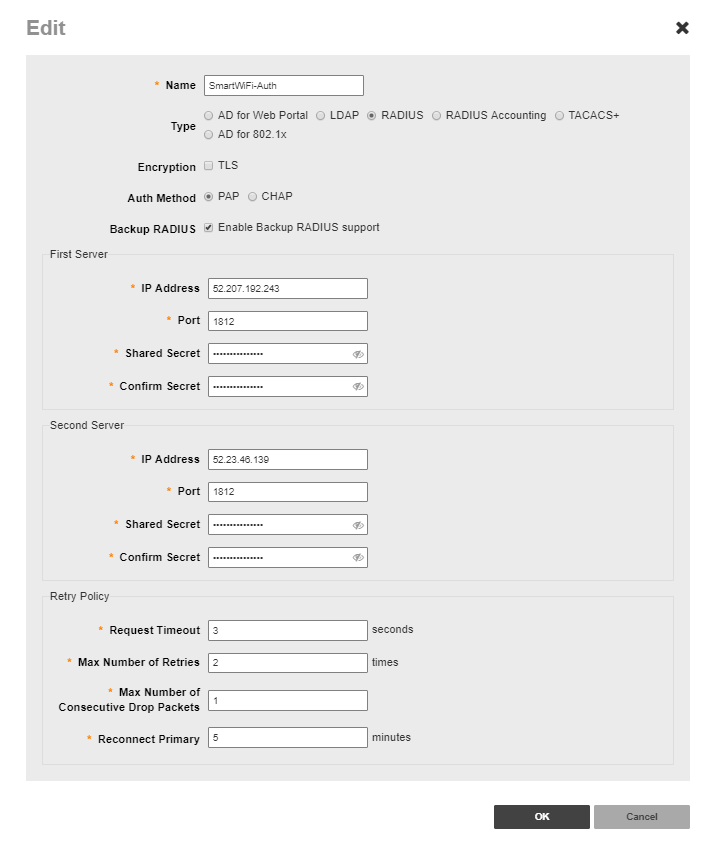
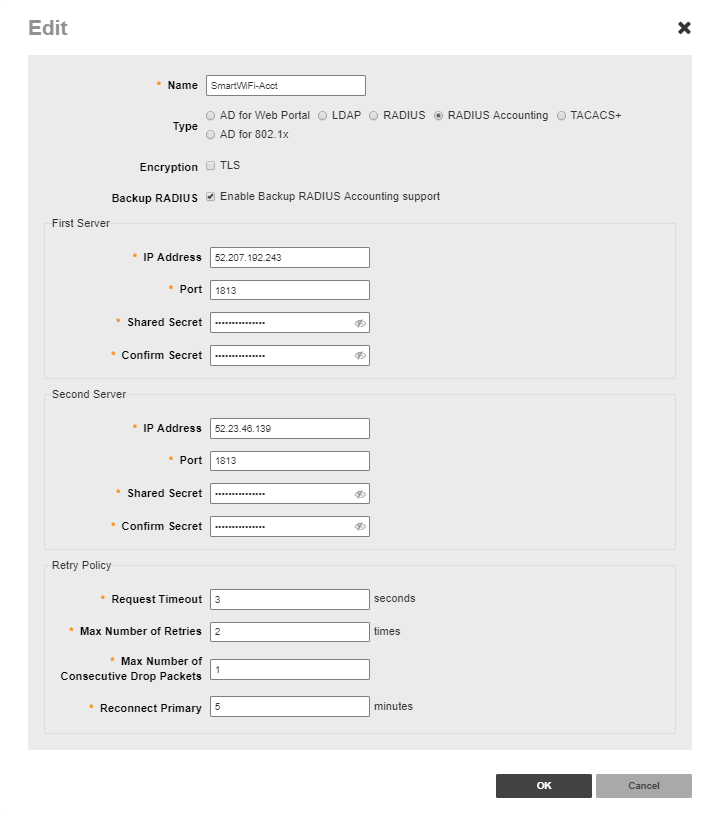 5. Configure Captive Portal Click Configure and select Hotspot Services
 6. Apply the Hotspot services to WLAN.
 Under Advanced options look for Inactivity Timeout and set it to a value greater than the Idle timeout of the session profile in the dashboard.
 7. Final Step To complete the set of your Smart WiFi you will need to SSH using an application like Putty to the ZoneDirector and type the commands below, one line at a time. The final step makes it so only the base AP MACs are necessary to enter into the dashboard as gateways.
enable

config

wlan "The name of your WLAN"

called-station-id-type ap-mac

end