
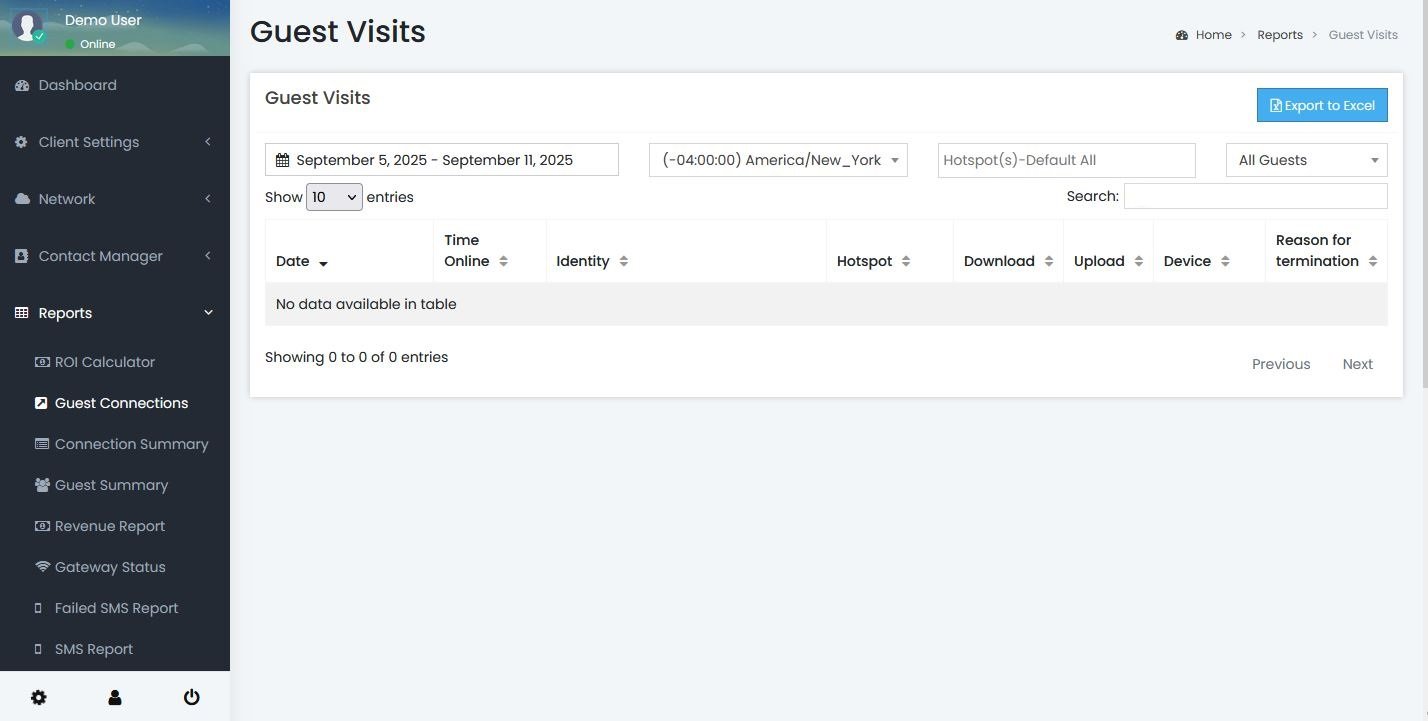
Show entries - Set how many guest connection records to show per page.
Date Range - Set the date range for the guest connections report.
Timezone - Set the timezone you want the report to be displayed in
Hotspot - Set the hotspot you want to view data for. By default all hotspots are displayed.
Guest type - Allows you to filter the report by new guests or repeat guests. By default all guests are displayed. A new guest is defined as a guest whose first connection was made within the date range specified. Any guest who has made a connection before the date range is treated as a return guest.
Date/Time - This is the date and time the guest connected to the Hotspot.
Time Online - This is the time (so far) that the guest has been connected to the Hotspot.
Identity - A clickable link to the guest profiles using the e-mail address, the name of the guest (as retrieved from their social media profile), their SMS number, or their device MAC address (Ie: AA-BB-11-22-33-44-55 if they have 'opted out' of supplying personal information). If there is a green dot after the username, then the guest is still currently connected at your Hotspot. 
Hotspot - This the Hotspot location the guest has connected at.
Download -This is the amount of data the guest has downloaded. Data is rounded to the nearest whole number.
Upload -This is the amount of data that the guest has uploaded. Data is rounded to the nearest whole number.
Reason for Termination- This is the Acct-Terminate-Cause packet sent from a controller. If the SmartWiFiPlatform does not receive one, "Auto Timeout" will be reported after the Force Timeout of the session profile. Definitions vary by hardware manufacturer but for general definitions please see HERE.
-
"Lost Carrier" means the guest device left the WiFi signal range and was logged-off
-
"Session Timeout" means the guest has reached the time limit that is setup for your Hotspot. You can modify this setting under Hotspot>Hotspot List>Edit - the adjust the "Force Timeout" and "Idle Timeout" settings according to your specific needs.
Device - This is the type of device the guest has connected with.
Export To Excel - Exports all guest connections currently displayed on the page to a CSV file.
Please make sure select your hotspot and you set the View filter to "All" if you would like to export all of the guest connections for the time period selected as the Export button will only export the connections currently displayed on the page.
Available Fields for Export
-
- Date
- Session Length
- Identity
- Location
- Username
- Phone Number
- First Name
- Last Name
- Birth Date
- Gender
- Upload
- Download
- Device
- Reason for termination
- Display Name
- Profile URL
- Social Type
- MAC
- Consent Text
- Unsubscribe- If this field is True it means a guest unchecked the 'Opt in to receive special offers from us' checkbox in the splash page builder.
- Postal Code
- Country
- Region
- City
- Address
- Custom fields 1 through 10