
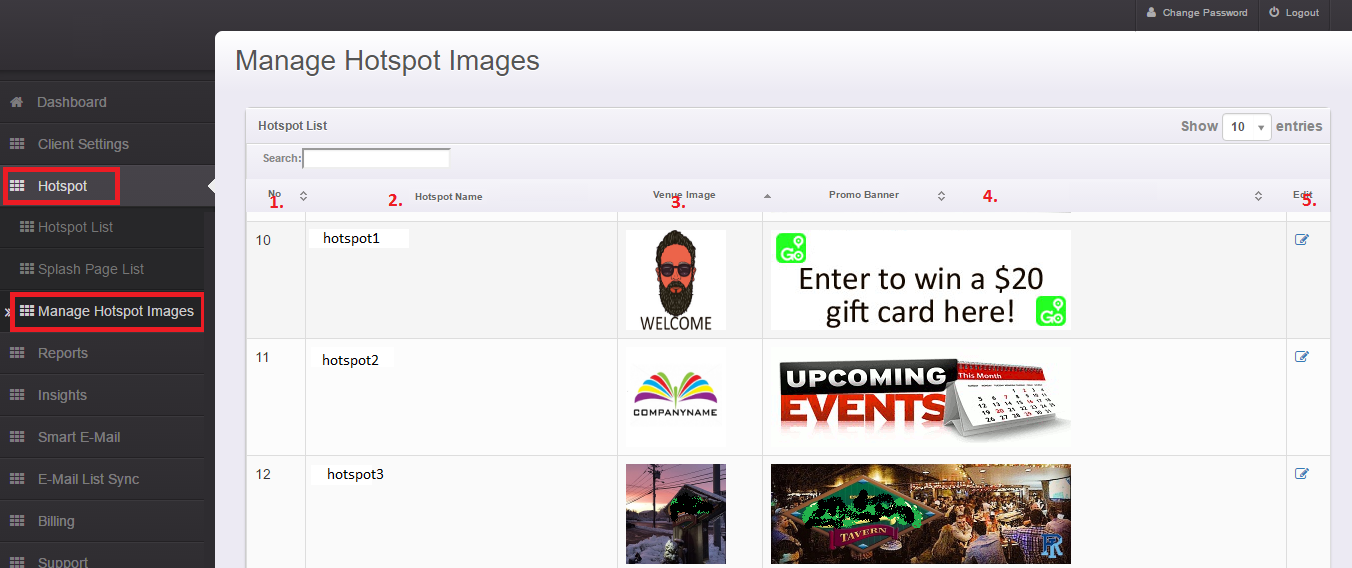
- No. - This is the ID number assigned by the Smart WiFi Dashboard.
- Hotspot Name - This displays the name of the Hotspot that the images are currently being displayed on.
- Venue Image - This is usually a 300x250px banner image showing the branding for the Hotspot location.
- Promo Banner - This is usually a 300x100px banner images that can display promotions or anything else you;d like to promote to guests when they connect to your Hotspot(s).
- Edit - Click Edit to make immediate changes to the images at your Hotspot(s).
The images you post here will over-ride the default venue image associated with the Splash page. This give you a versatile, easy to use tool to quickly modify images on your Hotspot(s). If you delete the venue image here then your default Splash Page venue image will still be displayed.