
- The Guest/Contact mobile number is marked as unsubscribed for the From number the platform attempted to send the message by.
- The Guest/Contact mobile number has been marked as an invalid phone number by the SMS provider.
- The Guest/Contact mobile number is blocked due to blacklisting.
The SMS Report displays the total number of SMS provider message credits your account consumes on a monthly basis.
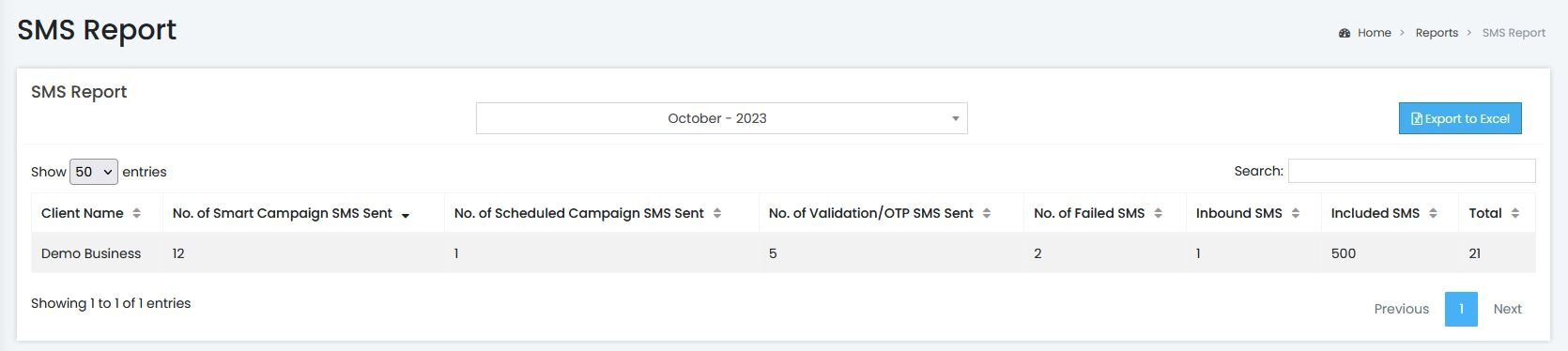
- The table breaks down the Total number of SMS sent for the month by the following:
- Number of Smart SMS Campaigns: SMS campaigns that were sent using a trigger-based format, i.e. New Guest WiFi connection, Return Guest connection WiFi connection, WiFi Guest birthday, etc.
- Number of Scheduled SMS Campaign: SMS campaigns that were sent using the Smart WiFi's SMS blast feature (SMS message sent to a specified list of Contact Profiles).
- Number of Hotspot SMS validation messages: SMS messages that provides a One-Time-Passcode (OTP). This message type is sent to guests who select the 'Sign in with SMS' login option and need to validate their provided SMS number.
- Inbound SMS messages: Usually indicates a reply SMS message sent by a recipient of an SMS marketing campaign (Smart or Scheduled).
- The 'Included SMS' column is configured according to your subscription.
- Example: If you pay for a subscription that allots you SMS 500 messages per month, you will see '500' as the value in the 'Included SMS' column. If you pay for a subscription that allots you 2,000 SMS messages per month, the value will be 2,000 in the 'Included SMS Column'.
- No. of Failed SMS are not counted towards the value in the 'Total' SMS column.
- This column represents communication failure between the platform and the SMS provider and is not an indication on the delivered status of an SMS message.